The free all-in-one UAD 3.6 appraisal software
Built from the ground up for UAD 3.6, not retrofitted from a legacy form engine. Comp research, market analytics, sketch, and form completion live in one window, and it's free on every order you write: Reggora, other AMCs, lender-direct, private fee.
GSE verified
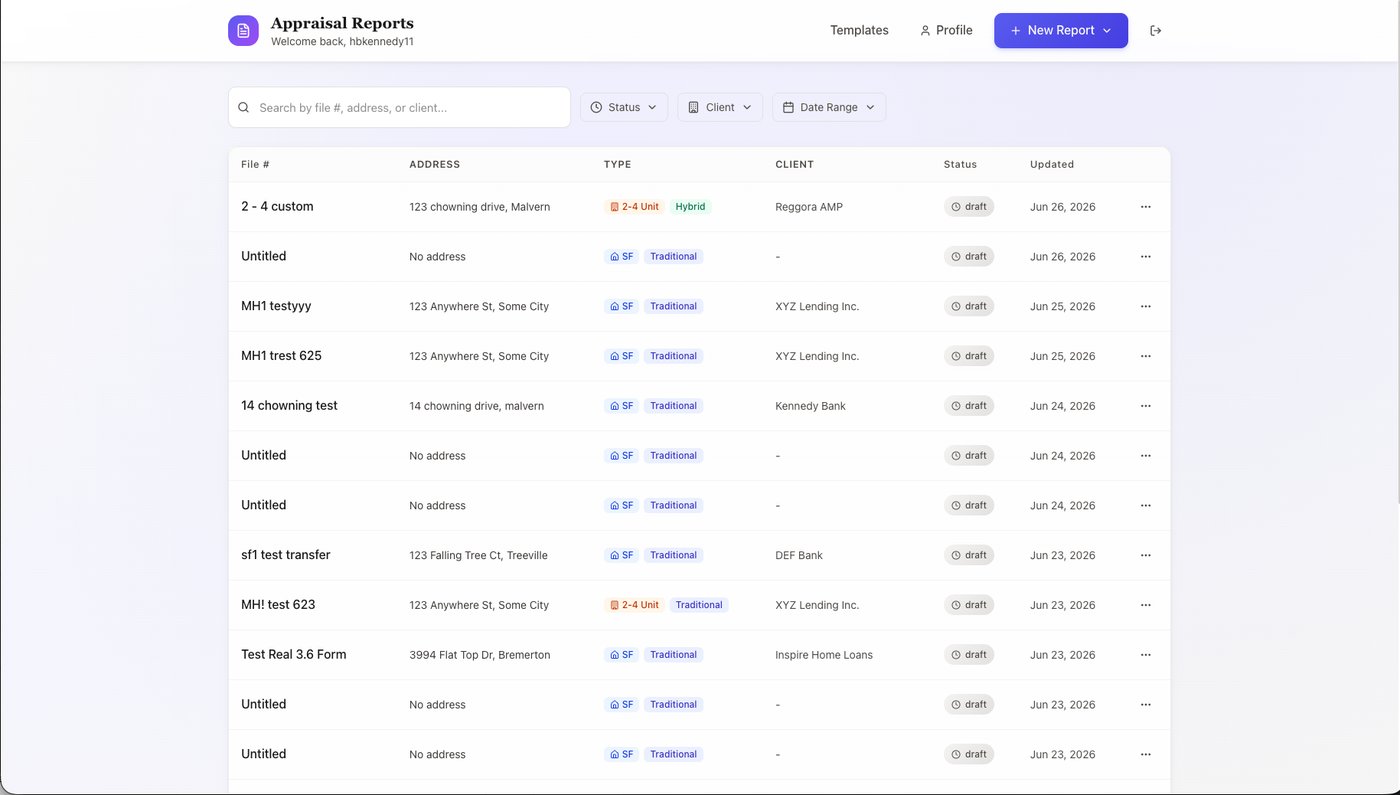
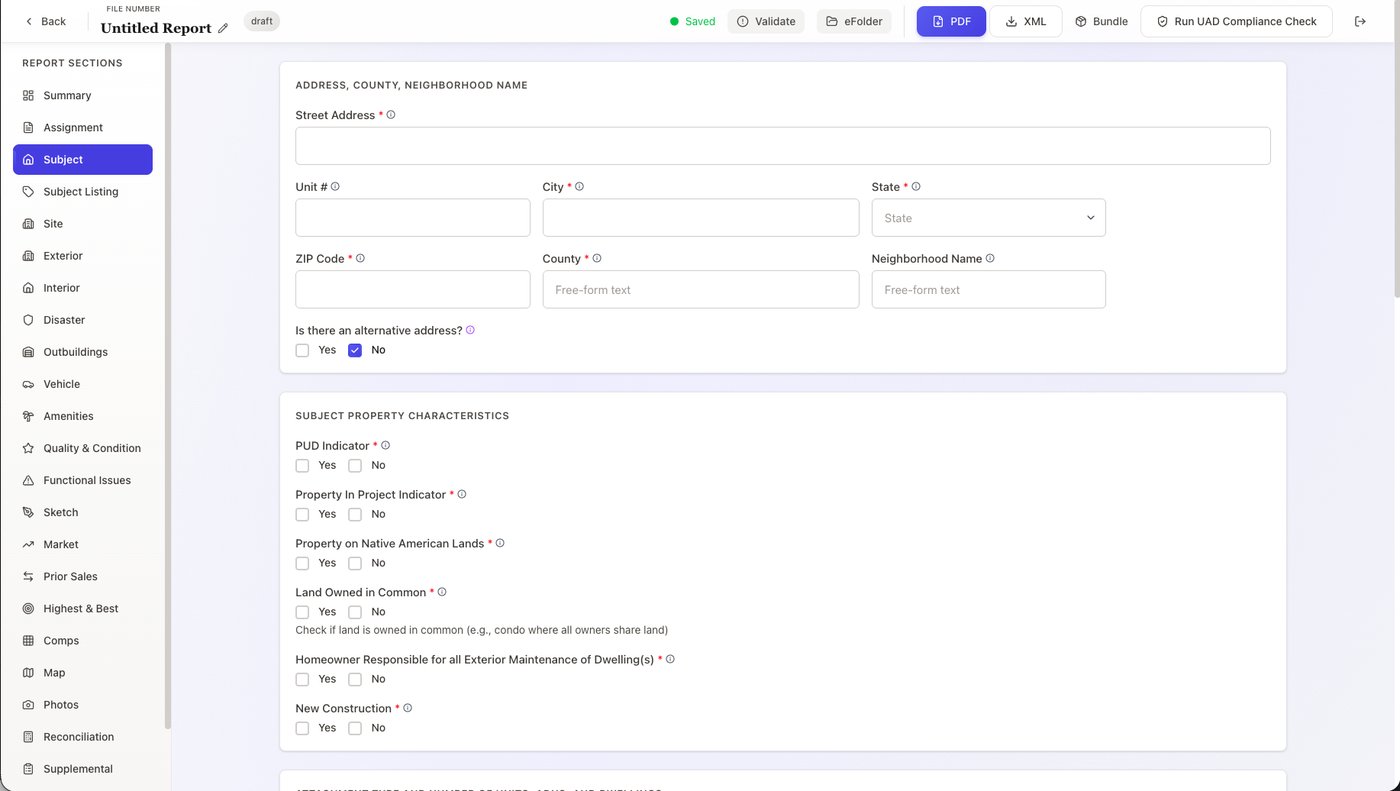
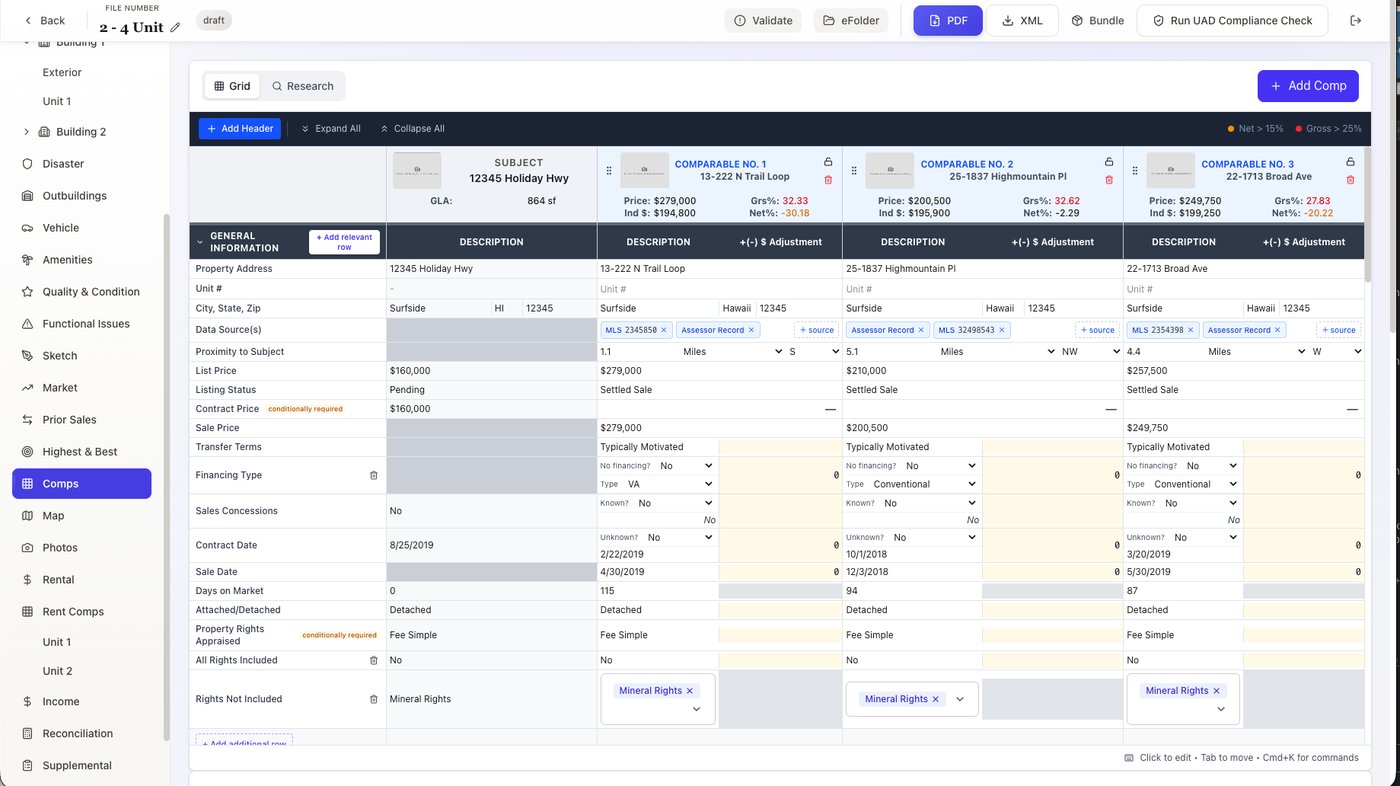
Start writing UAD 3.6 reports today
It's in your account right now.
Reggora Forms is already in every Reggora appraiser's account, with nothing to install. Log in and start your next report.
Log in to your accountJoin the panel — Forms comes with it.
Reggora Forms is available to appraisers on the Reggora panel. Joining is free, takes minutes, and also puts you in front of appraisal orders from 300+ lenders nationwide.
Join the appraiser panelThe Problem Today
Appraisers juggle 3–5 applications per report: a form-filler, a sidecar data tool, and standalone analytics. Each switch costs time, context, and accuracy.
The Reggora Forms Solution
One integrated workspace: browser-native, fully UAD 3.6 compliant, built for the format every GSE appraisal now requires. Research, analyze, and complete your report without ever leaving the tab.
Free on every appraisal order you perform, not just Reggora's.
Use Reggora Forms across every job in your pipeline: Reggora orders, other AMCs, lender-direct work, private fee. UAD 3.6 ready, $0 per report, no per-order upcharge.
Software Capabilities
Sketch
Draw floor plans right inside your report, with no separate sketch software.
- Draw quickly: outline living areas, garages, porches, decks and patios, then add interior walls, doors, and symbols like pools and fireplaces.
- Area calculations: every UAD 3.6 area type is calculated automatically for each unit, level, and dwelling.
- Report syncing: rooms, levels, areas, vehicle storage, and amenities fill in from your sketch.
- Delivery-ready prints with the required area calculations summary.
- Multi-floor homes: copy an area as a second floor or basement in one click, and floors are labeled automatically.
- Use your existing sketches too: upload sketch files alongside a drawn sketch, and both are delivered with the report.
- A guided practice mode walks you through the basics, and keyboard shortcuts are shown on each tool.
Mobile Inspection App
Do the inspection from your phone: sketch the property, take photos, or enter full report details on site. Back at your computer, open the report in Reggora Forms, click Phone inspection, review what came in, and import it. Sign in with the same Reggora account you use for Forms.
Dynamic Field Editor
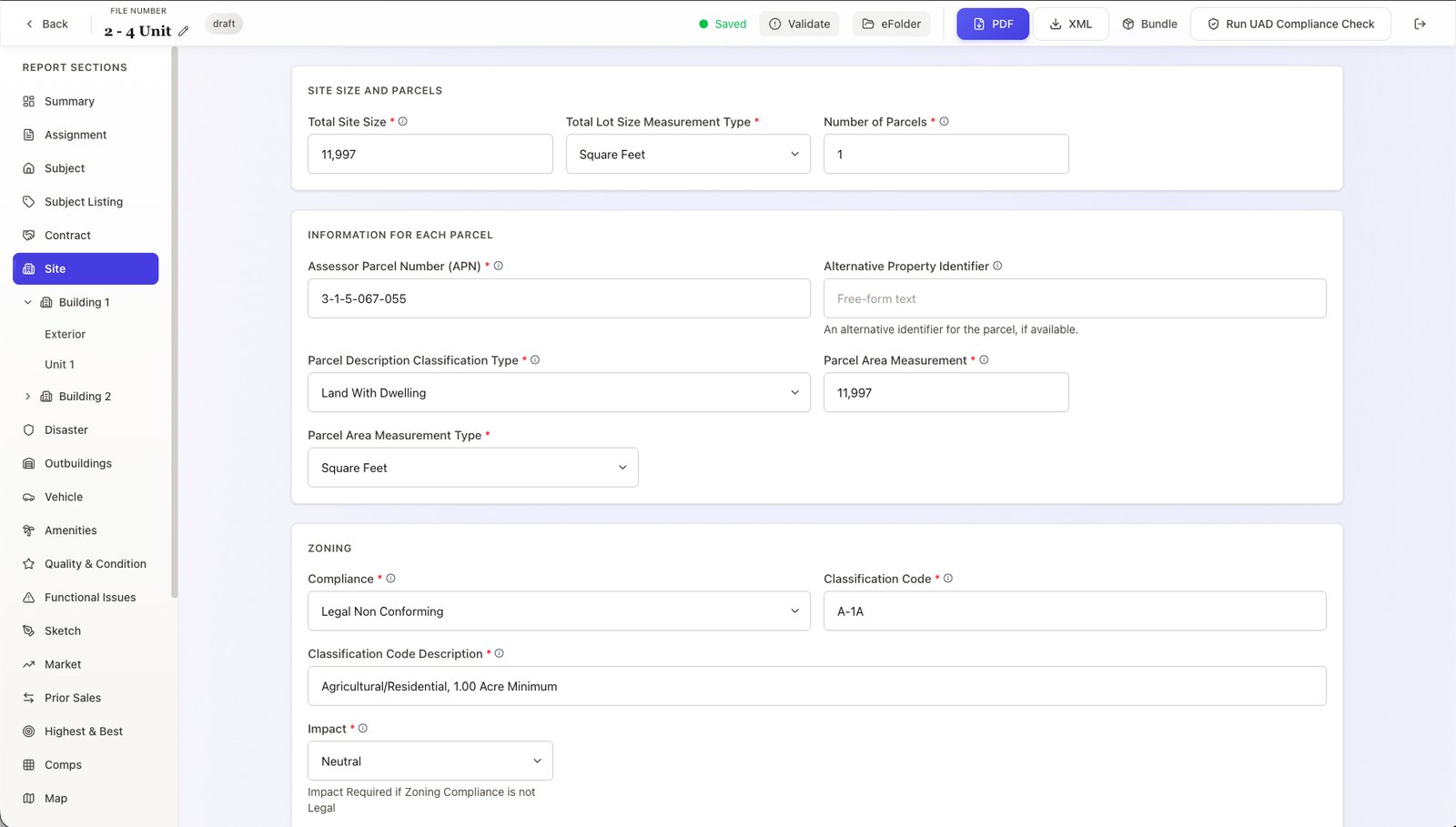
The UAD 3.6 spec has over 1,000 unique data points, with thousands of different permutations. We created a streamlined dynamic field editor, where you can view how the data looks in our "split view" mode, while also clearly seeing what fields are required, conditionally required, and optional.
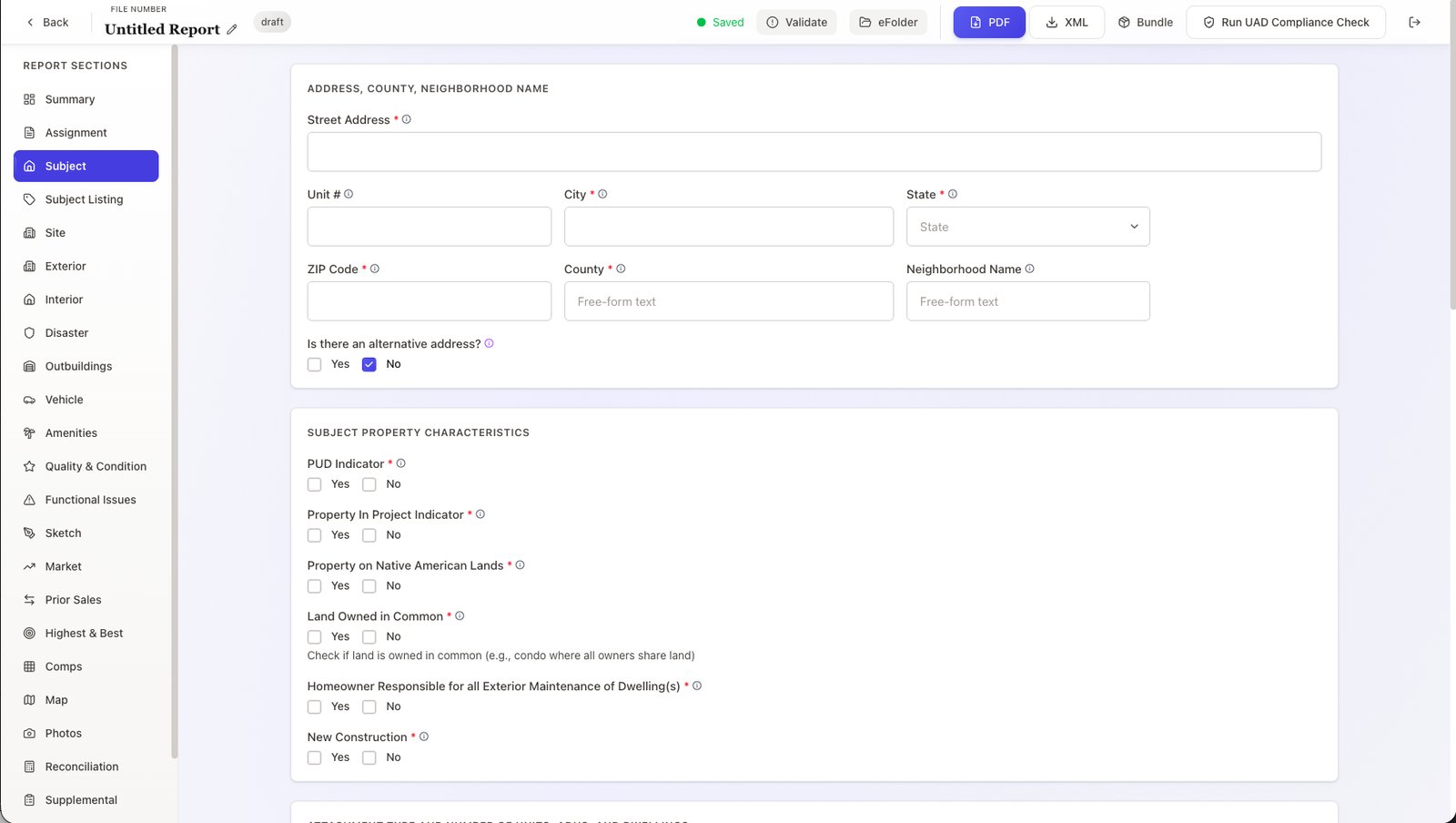
Integrated MLS & Public Records
MLS and Public Records are integrated directly into the field editor, comparable research, and market analytics. In each tab, easily view public-record and MLS data for the subject as you work through the report.
Sophisticated Comp Grid
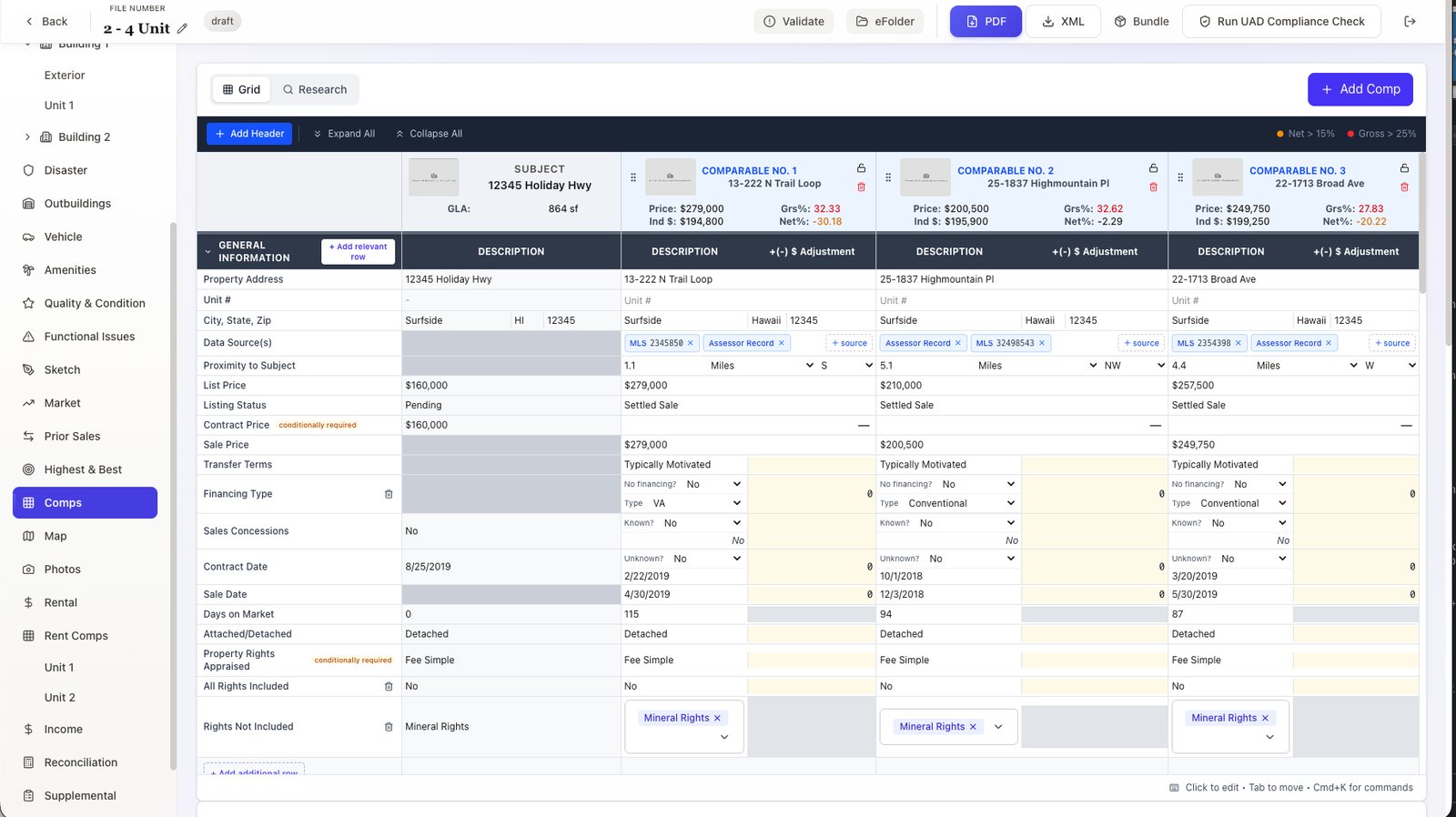
Every sales-comp header, sub-header, and field has multi-layered conditionality and visibility rules built into the grid to streamline comparable analysis. Based on subject and comparable data, Reggora Forms simplifies sales-comparable analysis while keeping the true grid feel appraisers are used to.
Rental Grid
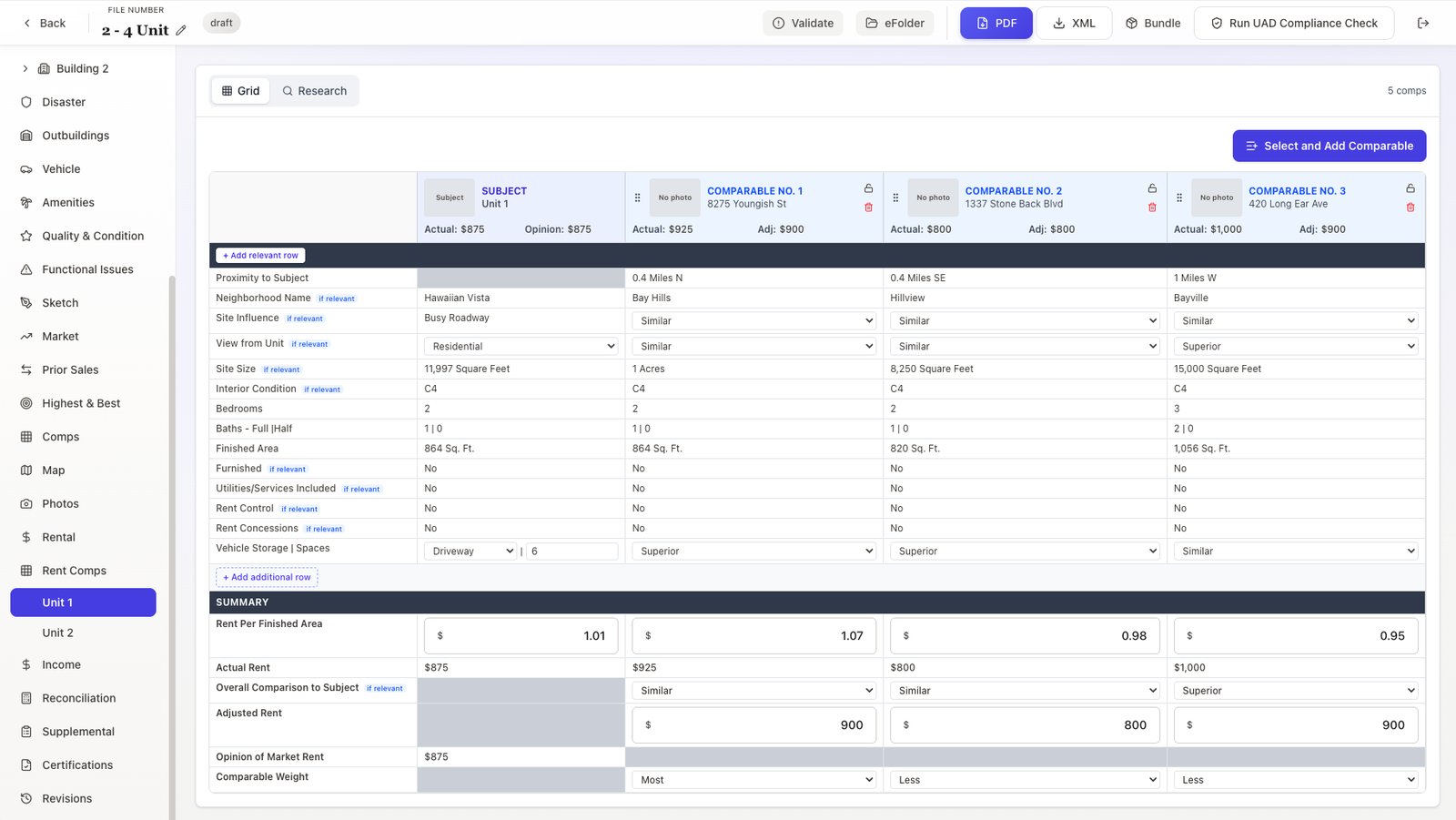
Easily select the subject units included in your rental grid, add your rental comps once, and pick the necessary comps for each unit comparison. No duplicate data entry across units.
Market Analytics
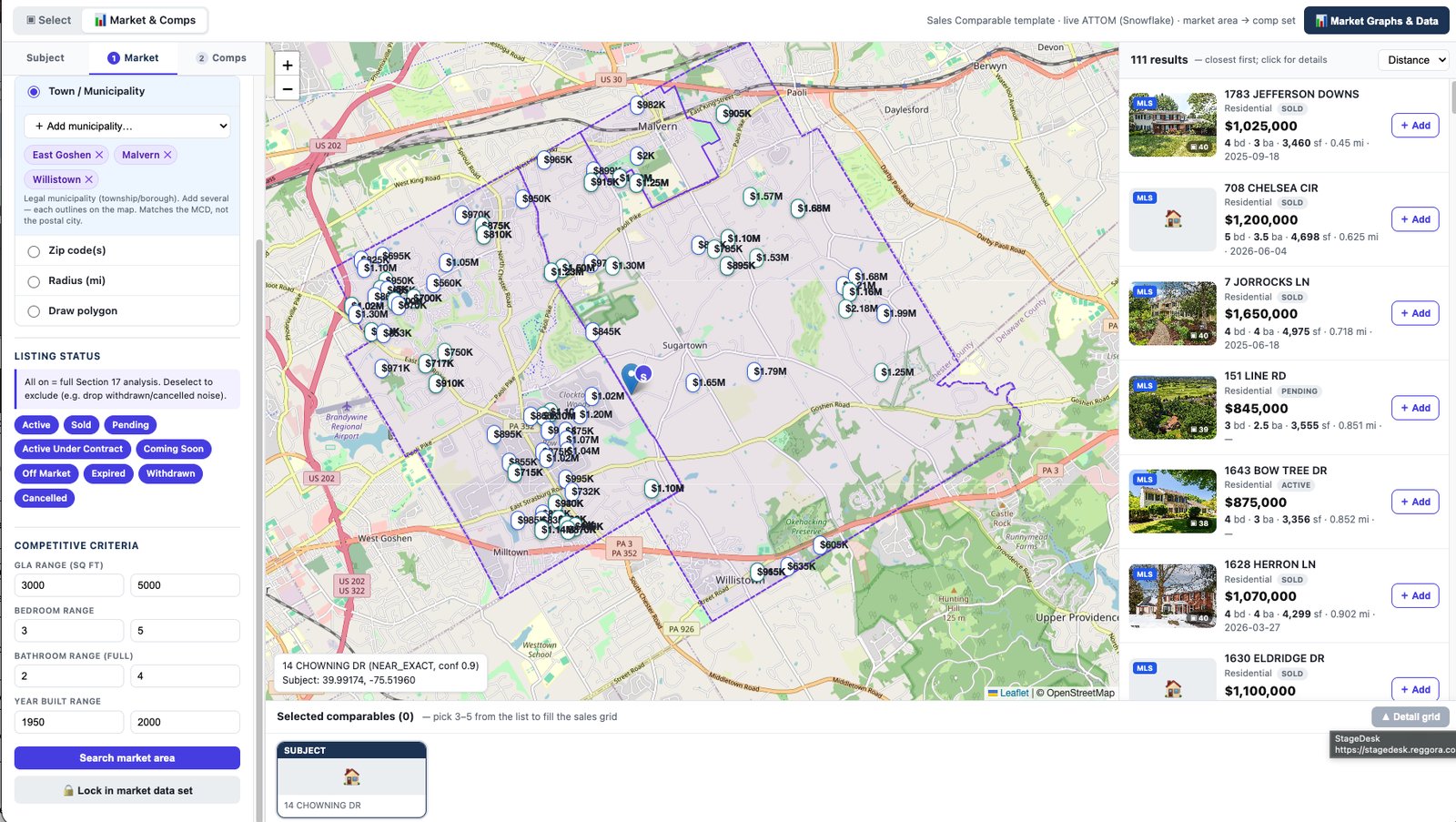
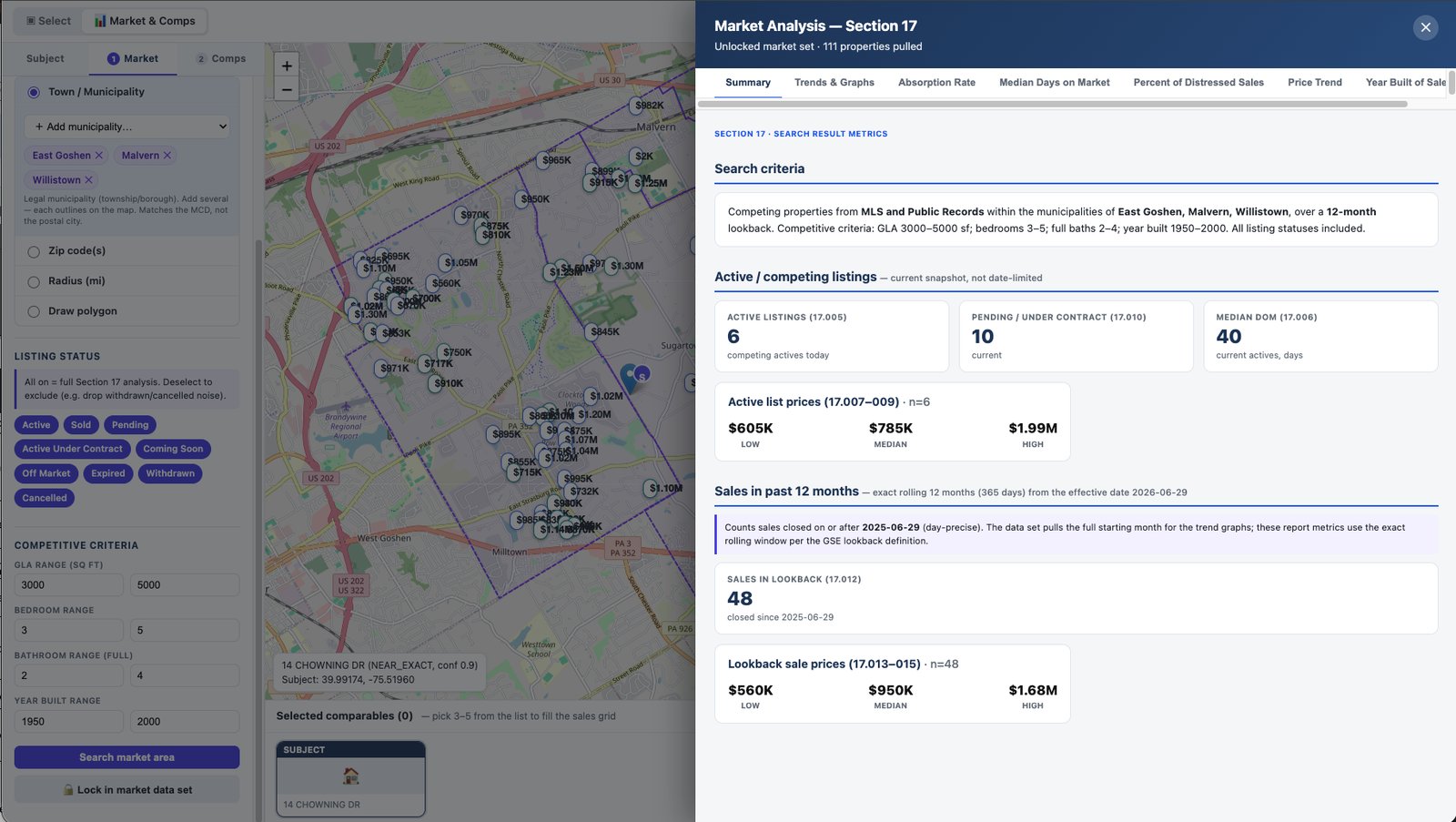
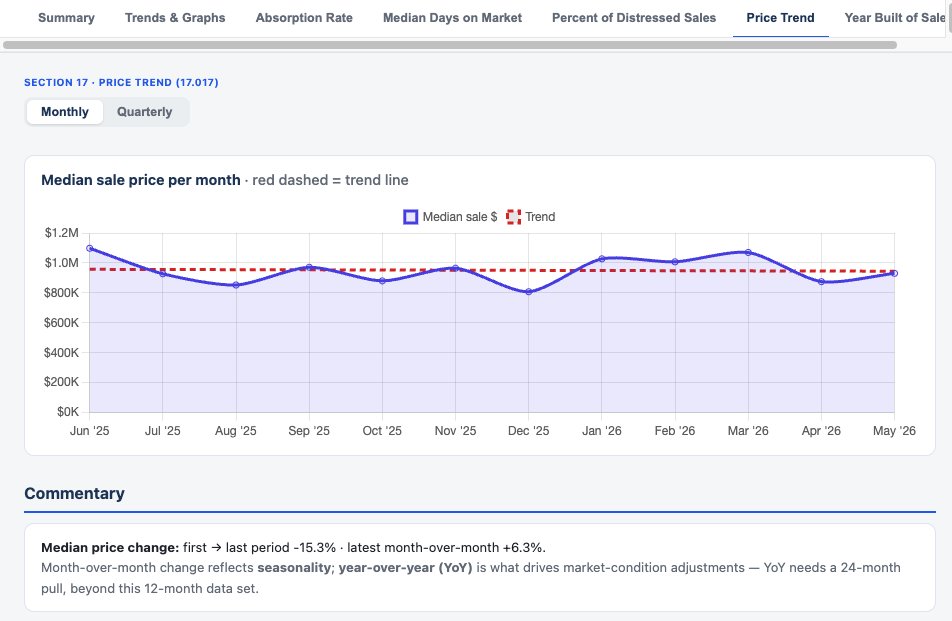
Based on the market data inside your set boundary, Reggora Forms auto-calculates tables, charts, and graphs you can customize, use for time adjustments, and import directly into your report with one click.
Additional features
PDF Preview
Preview the report and print drafts anytime.
Spell Check
On every comment and description field.
Photo Editor
One editor with crop, rotate, and privacy blur.
Comp Grid Views
Compact and full-screen views, easier rows, and saved row templates.
Research Workspace
Full-screen mode, resizable results, and easier polygon drawing.
Better MLS Search
Improved results for new construction and multi-unit properties.
Why Appraisers Switch
100% Free on Every Order
Completely free, on every appraisal you perform. No per-report cost, no upgrade tier, no upcharge for non-Reggora orders. Reggora orders, other AMCs, lender-direct, private fee. Same workspace, $0.
Never Leave the Form
Sidecar tools export via .tdcx. Reggora Forms is the form. Zero context switching, zero file-format friction.
Transparent, Defensible Math
Every suggestion shows its derivation on hover. No black boxes. Explain any number to any reviewer.
One Surface, Three Comp Types
Sales, Rental, and Land use the same research pattern. Shared property data propagates automatically.
Built New for UAD 3.6, Not Retrofitted
Verified by Fannie Mae and Freddie Mac. 709 compliance rules from Appendix H-1 validate every report, and 1,625 spec fields drive the form.
Prior Reports Are a First-Class Source
Every finalized comp auto-archives to your personal library alongside live MLS data.
Technical Specifications
Reggora Forms FAQ
Is Reggora Forms built for UAD 3.6?
Yes. Reggora Forms is natively built on the UAD 3.6 specification rather than converting from a legacy form engine. All 1,625 spec fields from Appendix A-1 drive the form, and 709 compliance rules from Appendix H-1 (578 fatal, 131 warning) validate the report as you write, so errors surface before the report reaches UCDP.
Is Reggora Forms verified by Fannie Mae and Freddie Mac?
Yes. Reggora Forms is verified by Fannie Mae and Freddie Mac for UAD 3.6. It is listed as a UAD 3.6 appraisal software provider on Fannie Mae’s Integrated Vendor List and appears on Freddie Mac’s software providers list. It delivers UAD 3.6 XML, MISMO, and PDF output across all seven report types.
Is Reggora Forms really free?
Yes. Reggora Forms costs $0 on every appraisal you perform, with no per-report fee, subscription, or upgrade tier. That includes orders that do not come from Reggora: other AMCs, lender-direct work, and private-fee assignments.
Who can use Reggora Forms?
Every appraiser on the Reggora panel. If you already have a Reggora account, it is already in your account. If you are new to Reggora, joining the panel is free, takes minutes, and also gives you access to appraisal orders from 300+ lenders nationwide.
Does Reggora Forms support UAD 2.6?
UAD 2.6 support is in development and will run in the same workspace and comp library as UAD 3.6. UAD 2.6 remains in use for some reports through the GSE transition, and is fully retired on June 28, 2027.
Do I need to install anything?
No. Reggora Forms runs in your web browser, so there is nothing to install on your computer and updates reach every appraiser at once as the UAD 3.6 rules change. For on-site inspections, there is an optional mobile app for iOS and Android.
How does Reggora Forms compare with other UAD 3.6 appraisal software?
The biggest differences between UAD 3.6 appraisal software are whether the platform is native 3.6 or a converter, how it validates compliance, whether it handles UAD 2.6 alongside 3.6, how MLS and public-records data reach the report, and total cost across your order mix. Our evaluation guide compares the main options and covers the questions to ask every vendor, including us.
Read the guide to choosing the best UAD 3.6 appraisal software →
The new standard for UAD 3.6 reports. Free on every order.
Join the 10,000+ appraisers who have already explored Reggora Forms. Every order, every report type, $0.
100% free. No hidden fees.